Monzo statement to Excel
Turn your Monzo statement into a spreadsheet with money in and money out apart, the balance after every payment, and pot transfers easy to filter.
- Checked every row against your balance
- Private read on your device first
- Excel & CSV plus QuickBooks, Xero and Quicken files
- Free no sign-up, no page limits
A Monzo PDF statement has four columns — Date, Description, (GBP) Amount and (GBP) Balance — with money out written as a negative amount. Moving money into a pot also appears as a payment out, which makes your spending look higher than it is. StatementEasy splits the Amount column into money out and money in, checks each balance, and keeps the word “Pot” in the description so you can filter those transfers out in one click.
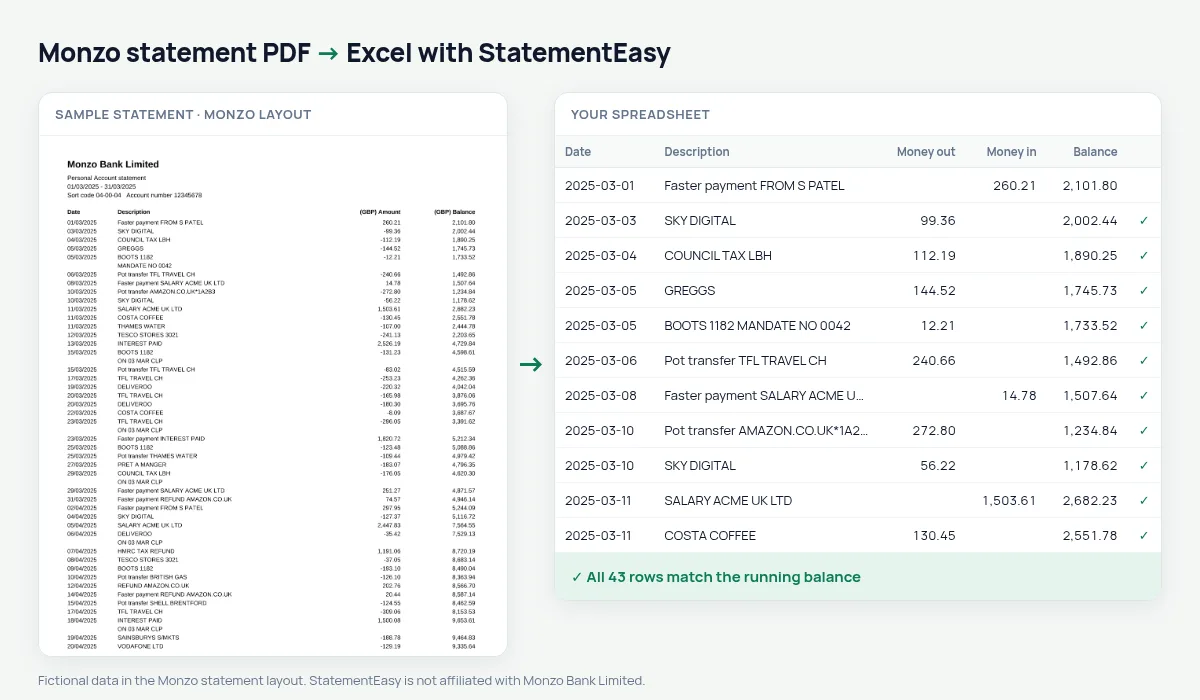
Get a PDF statement from Monzo
- Open the Monzo app.
- Go to the account, then Statements. It may be under Help if you search for “statement”.
- Choose the period and PDF. You can pick several months.
- Save the file and drop it here.
Monzo can also export CSV from the app. The PDF statement is the official document with balances, which is what a lender or an accountant usually asks for.
One signed column, two in your sheet
| On the Monzo statement | In your sheet |
|---|---|
| -12.40 | Money out 12.40 |
| 2,150.00 | Money in 2150.00 |
| (GBP) Balance | Balance, checked on every row |
| 01/03/2025 | A real date, day first |
Pots, spending and budgets
Monzo users often move money to pots for bills and savings. In the spreadsheet, filter out the pot transfers to see what you really spent; the Categories sheet then totals groceries, eating out, transport and bills, and Recurring lists subscriptions and direct debits. If you prefer to keep Monzo’s single signed column, choose “One amount (+/−)” before exporting.
For freelancers and sole traders
If you invoice from a Monzo account, convert the statements for the tax year (6 April to 5 April) and export Xero CSV, QBO or CSV for your bookkeeping software or accountant.
Monzo statements for a mortgage or a rental
Mortgage lenders and letting agents accept Monzo statements like any other bank’s. They look for regular income, the commitments you already pay and how low the balance gets. Convert three to six months, filter out the pot transfers, and open Insights: salary, rent, loans and subscriptions are grouped, with the lowest balance of the period, so you see what the lender will see.
Several Monzo statements together
You can export one long Monzo statement or one per month. Either way, drop the PDFs together and choose “All files combined” for one sheet in date order; any transaction that appears in two overlapping statements is counted once.
Last tested October 2026. StatementEasy is not affiliated with Monzo Bank Limited.
Questions
Does it work with Monzo Business statements?
Business statements use a similar signed Amount and Balance layout and are read by the same rules; the balance check on your file confirms the result.
Are pot transfers counted as spending?
They appear as money out because that is how Monzo prints them, but the description keeps the word Pot, so they are easy to filter out.
Can I convert a Monzo joint account statement?
Yes. Joint account statements use the same columns.
Is my statement uploaded?
Your browser reads the PDF first. Only if it cannot is the file read on our server, and deleted after reading.
Is StatementEasy made by Monzo?
No. StatementEasy is an independent tool and is not affiliated with Monzo Bank Limited.
Your next statement, in a spreadsheet
Free, no limits. No sign-up.