Navy Federal statement to Excel
Turn your Navy Federal checking or savings statement into a spreadsheet: money out and money in apart, real dates, and the balance checked on every line.
- Checked every row against your balance
- Private read on your device first
- Excel & CSV plus QuickBooks, Xero and Quicken files
- Free no sign-up, no page limits
Navy Federal statements list each account as Date, Transaction Detail, Amount($) and Balance($), between a Beginning Balance and an Ending Balance line. Money out is written with the minus sign after the number — 45.00- — and dates are short, like 03-05, with a two-digit year in the statement period. StatementEasy reads the trailing minus, gives each date its full year and checks every balance from the Beginning Balance to the Ending Balance.
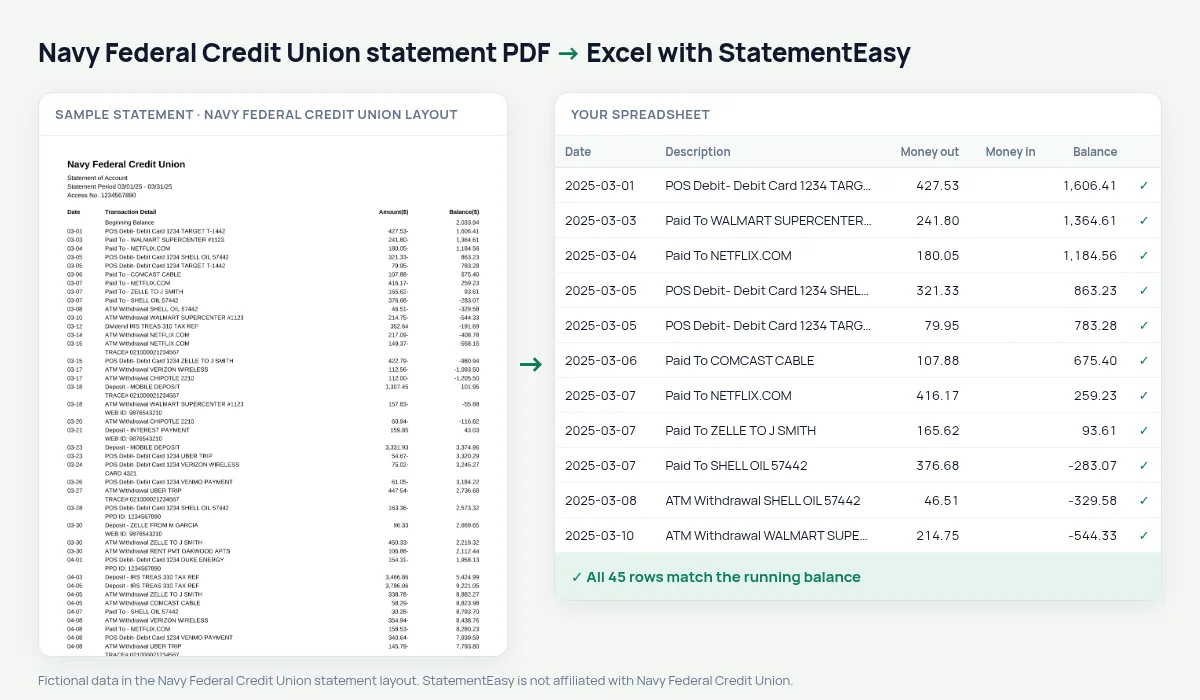
Download your Navy Federal statement
- Sign in to Navy Federal online banking or the app.
- Open Statements (under Documents or the account).
- Choose the month and download the PDF.
- Drop it here.
Navy Federal amounts and dates
| On the statement | In your sheet |
|---|---|
| 45.00- | Money out 45.00 |
| 2,350.00 | Money in 2350.00 |
| 03-05 (period 03/01/25 – 03/31/25) | 2025-03-05 |
| Beginning / Ending Balance | Start and end of the check, not rows |
| Dividend | Money in |
Checking, savings and the dividends
Navy Federal checking and savings are share accounts, and dividends paid on savings appear as money in. Over a year, the Categories sheet totals them, which is the figure your 1099-INT should match.
For service members and veterans
Statements are often needed for a VA home loan, a PCS move, a rental off base or a security clearance financial review. Convert the months requested and open Insights: regular pay (DFAS deposits), allotments and recurring bills, the large deposits a lender may ask about, and the lowest balance. The bank’s PDF is still what you submit; the spreadsheet helps you check it first.
Last tested October 2026. StatementEasy is not affiliated with Navy Federal Credit Union.
Questions
Why do some amounts end with a minus?
That is how Navy Federal marks money out. It becomes a positive amount in the Money out column.
My statement shows a two-digit year. Are the dates right?
Yes. The year comes from the statement period, even when it is printed with two digits.
Can I convert a Navy Federal credit card statement?
Use the credit card converter.
Is my statement uploaded?
Your browser reads the PDF first. Only if it cannot is the file read on our server, and deleted after reading.
Is StatementEasy made by Navy Federal Credit Union?
No. StatementEasy is an independent tool and is not affiliated with Navy Federal Credit Union.
Your next statement, in a spreadsheet
Free, no limits. No sign-up.