OCBC statement to Excel
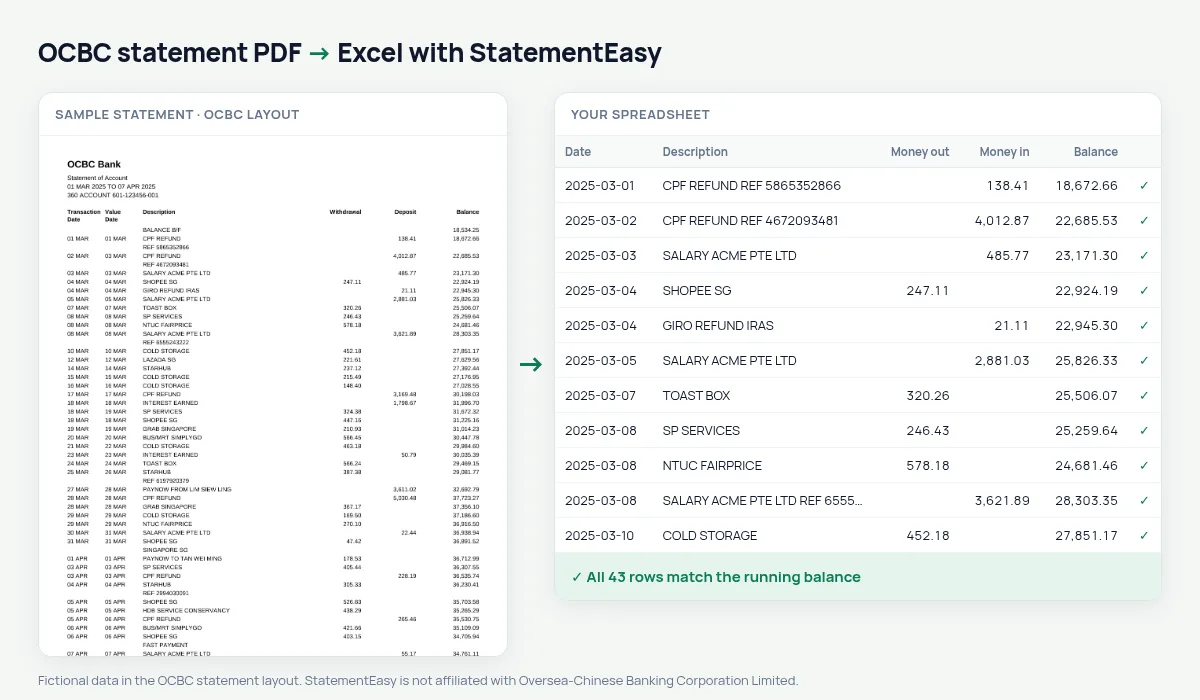
Turn your OCBC statement into a spreadsheet with both dates kept, withdrawals and deposits as numbers and every balance checked.
- Checked every row against your balance
- Private read on your device first
- Excel & CSV plus QuickBooks, Xero and Quicken files
- Free no sign-up, no page limits
OCBC statements list Transaction Date, Value Date, Description, Withdrawal, Deposit and Balance, with dates like 05 MAR and a BALANCE B/F line. StatementEasy keeps both dates, gives them their year from the statement period and checks every balance from the brought-forward figure.
Download your OCBC statement
- Log in to OCBC Digital (app or web).
- Open the account, then e-Statements.
- Save the OCBC statement as a PDF.
- Drop the OCBC PDF into the converter above.
OCBC columns in your sheet
| On the OCBC statement | In your sheet |
|---|---|
| Transaction Date / Value Date | Date / value date |
| 05 MAR | 2025-03-05 |
| Withdrawal / Deposit | Money out / money in |
| Balance | Checked on every row |
| BALANCE B/F | Opening balance, not a row |
OCBC 360 bonus interest
OCBC 360 pays bonus interest when you credit your salary, save, spend or insure. Filter the interest credits to see what you earned each month, and the Monthly sheet to check that your salary was credited every month.
Statements for a rental or a loan
Convert the last three months and open Insights for regular income, recurring payments and the lowest balance.
Exports
Download Excel, CSV, QuickBooks or Xero files.
Last tested October 2026. StatementEasy is not affiliated with Oversea-Chinese Banking Corporation Limited.
Questions
Are both dates kept?
Yes, the transaction date and the value date.
Does it work with OCBC business accounts?
Statements with the same columns are read the same way; the balance check confirms the result.
Is my statement uploaded?
Your browser reads the PDF first. Only if it cannot is the file read on our server, and deleted after reading.
Is StatementEasy made by OCBC?
No. StatementEasy is an independent tool and is not affiliated with Oversea-Chinese Banking Corporation Limited.
Your next statement, in a spreadsheet
Free, no limits. No sign-up.