Revolut statement to Excel
Turn your Revolut GBP statement into a spreadsheet: amounts as numbers, top-ups, transfers and exchanges kept apart, and the balance checked on every row.
- Checked every row against your balance
- Private read on your device first
- Excel & CSV plus QuickBooks, Xero and Quicken files
- Free no sign-up, no page limits
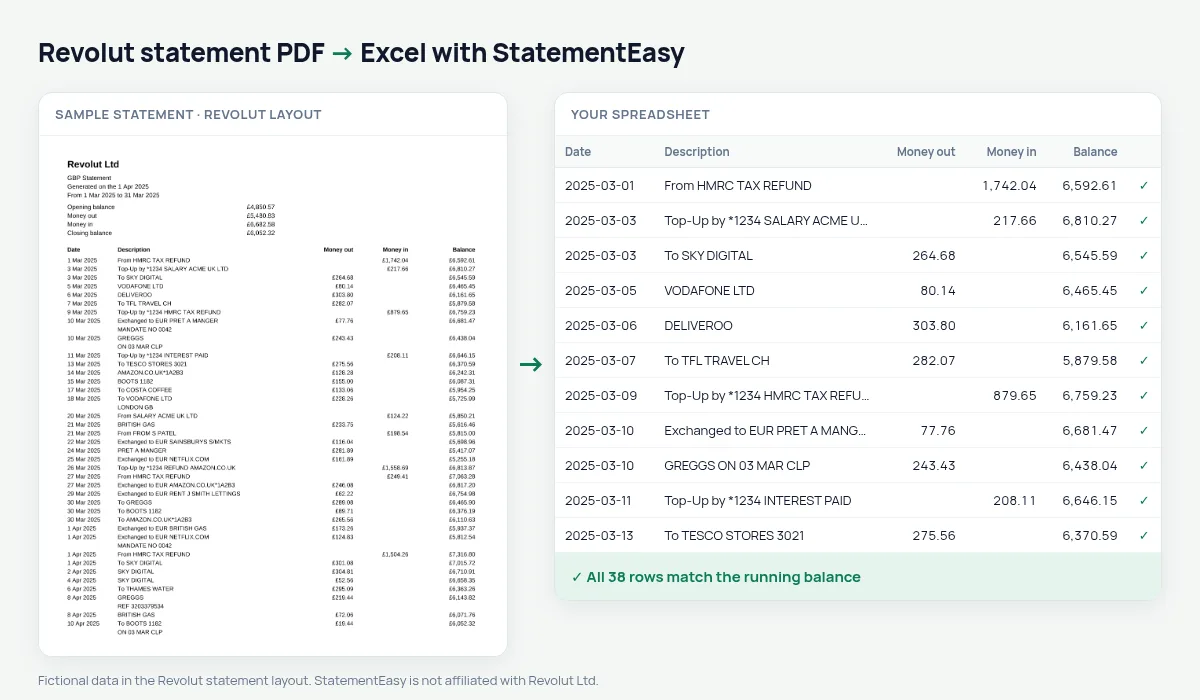
A Revolut statement starts with a summary box — opening balance, money out, money in, closing balance — and then lists Date, Description, Money out, Money in and Balance, with every amount written with the pound sign: £12.40. StatementEasy reads those amounts as numbers, leaves the summary out of the transactions and checks each balance after it. Dates such as 5 Mar 2025 become real dates.
Download a Revolut statement
- Open the Revolut app.
- Open the GBP account, tap the … menu, then Statement.
- Choose PDF, then the period. Monthly or a custom range.
- Save the PDF and drop it here.
Revolut gives each currency its own statement. Convert the GBP, EUR or USD statements separately, or drop them together to get one file per currency.
Revolut lines in your sheet
| On the Revolut statement | In your sheet |
|---|---|
| £12.40 | 12.40 as a number |
| Top-Up by *1234 | Money in, card ending kept |
| Exchanged to EUR | Money out from the GBP account |
| Summary box | Not added as rows |
Exchanges and transfers between your accounts
When you exchange pounds into euros, the GBP statement shows money out and the EUR statement shows money in. Converted separately, each statement still balances on its own. If you total your spending, filter out the exchange lines so moving money between your own currencies is not counted as spending.
Revolut for freelancers and travellers
For a tax return or an expense claim, the Categories sheet groups card payments, transfers and top-ups, and Insights lists the biggest payments and recurring subscriptions. Export Xero CSV, QBO or CSV for your bookkeeping software.
Revolut statements for a rental, a visa or a loan
Letting agents, consulates and lenders sometimes ask for statements from every account you use. Convert your Revolut GBP statement for the period they ask for and open the Monthly sheet: money in, money out and the closing balance for each month. Insights adds the regular payments and the largest credits — the lines you may be asked about.
Card payments abroad
Payments made abroad appear on the GBP statement in pounds, with the merchant and often the city in the description. Filter by those words to total a trip, or use the Categories sheet to see travel, eating out and shopping separately for the months you were away.
Last tested October 2026. StatementEasy is not affiliated with Revolut Ltd.
Questions
Does it work with Revolut Business statements?
Business statements have a similar layout and are read by the same rules; the balance check on your file confirms the result.
Can I convert a EUR statement?
Yes. Amounts with the euro sign are read the same way; each currency’s statement is converted on its own.
Can I convert a statement covering several months?
Yes. A custom-range Revolut statement is read in one go, with the balance checked across every page.
Is my statement uploaded?
Your browser reads the PDF first. Only if it cannot is the file read on our server, and deleted after reading.
Is StatementEasy made by Revolut?
No. StatementEasy is an independent tool and is not affiliated with Revolut Ltd.
Your next statement, in a spreadsheet
Free, no limits. No sign-up.