Scotiabank statement to Excel
Turn your Scotiabank statement into a spreadsheet with amounts withdrawn and deposited as numbers and every balance checked.
- Checked every row against your balance
- Private read on your device first
- Excel & CSV plus QuickBooks, Xero and Quicken files
- Free no sign-up, no page limits
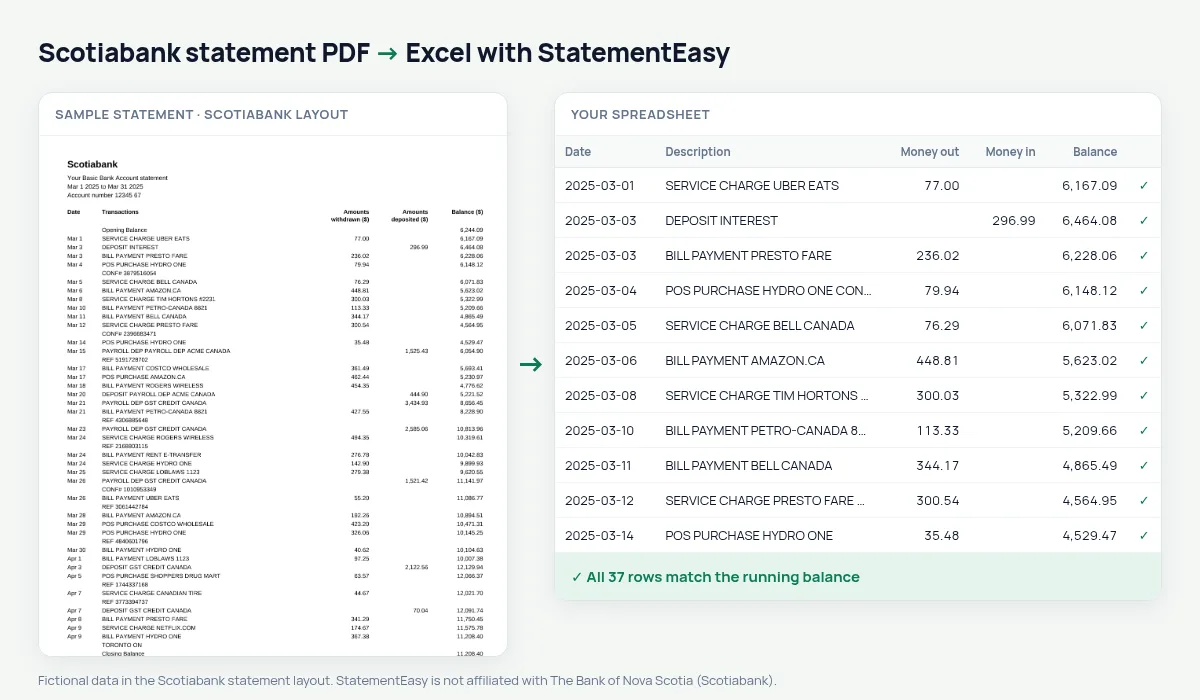
Scotiabank statements print their money columns with titles on two lines — Amounts / withdrawn ($), Amounts / deposited ($) — next to Date, Transactions and Balance ($), between an Opening Balance and a Closing Balance line. Dates are short, like Mar 5. StatementEasy reads the split titles as one, gives every date its year from the statement period, leaves the opening and closing lines out of the transactions and checks every balance in between.
Download your Scotiabank eStatement
- Sign in to Scotia OnLine or the Scotia app.
- Open the account, then eStatements.
- Pick the statement and download the PDF.
- Drop it here.
Scotiabank columns in your sheet
| On the Scotiabank statement | In your sheet |
|---|---|
| Amounts withdrawn ($) | Money out |
| Amounts deposited ($) | Money in |
| Balance ($) | Checked on every row |
| Opening / Closing Balance | Not added as rows |
| Mar 5 | 2025-03-05 |
Service charges and fees
Monthly plan fees, overdraft fees and transaction charges appear as their own lines, often called SERVICE CHARGE. Filter for them, or open the Categories sheet, where fees are grouped, to see what your account plan costs over a year — useful when you compare plans.
For taxes and small business books
Convert January to December together, export QBO for QuickBooks or CSV for other software, and use Reconcile to compare the statement with an export from your books.
Last tested October 2026. StatementEasy is not affiliated with The Bank of Nova Scotia (Scotiabank).
Questions
Does it work with a Scotiabank savings account statement?
Savings statements with the same withdrawn, deposited and balance columns are read the same way, interest included as money in.
My PDF has several months in it. Is that fine?
Yes. Every page is read and the balance is followed from the first opening balance to the last closing balance.
Can I convert a Scotiabank credit card statement?
Use the credit card converter.
Is my statement uploaded?
Your browser reads the PDF first. Only if it cannot is the file read on our server, and deleted after reading.
Is StatementEasy made by Scotiabank?
No. StatementEasy is an independent tool and is not affiliated with The Bank of Nova Scotia (Scotiabank).
Your next statement, in a spreadsheet
Free, no limits. No sign-up.