Starling Bank statement to Excel
Turn your Starling personal or business statement into a spreadsheet with the payment type, money in, money out and the balance on every row.
- Checked every row against your balance
- Private read on your device first
- Excel & CSV plus QuickBooks, Xero and Quicken files
- Free no sign-up, no page limits
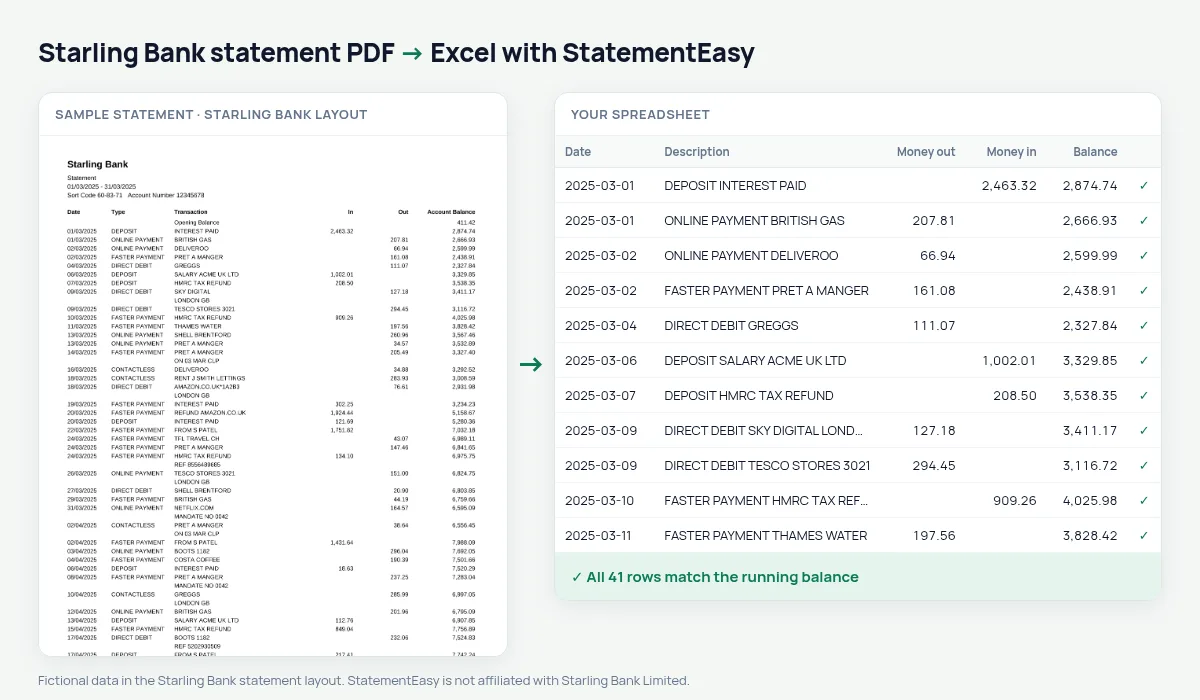
Starling statements list Date, Type, Transaction, In, Out and Account Balance. The Type column says how the money moved — CONTACTLESS, ONLINE PAYMENT, DIRECT DEBIT, FASTER PAYMENT — and the Transaction column says who with. StatementEasy keeps both in the description, reads In and Out as numbers, and checks each Account Balance from the opening balance on.
Download a Starling statement
- Open the Starling app. Or log in to Starling online banking.
- Go to Account, then Statements.
- Pick the month and download the PDF.
- Drop it here.
Starling columns in your sheet
| On the Starling statement | In your sheet |
|---|---|
| Type CONTACTLESS | Kept at the start of the description |
| Transaction | Description |
| In | Money in |
| Out | Money out |
| Account Balance | Balance, checked on every row |
Starling business accounts
Many sole traders and small companies bank with Starling. Starling has its own integrations with accounting software, but for months before you connected it, or for an accountant who wants a file, convert the statements and export Xero CSV, QBO or CSV. Reconcile compares a statement with an export from your books and lists what is missing on either side.
Spaces and saving goals
Money moved into a Space appears on the statement as a transfer. It stays in the description, so you can filter Space transfers out when you total your spending, or keep them to see how much you saved each month in the Monthly sheet.
Starling statements for a mortgage or a rental
For a mortgage or a tenancy you will usually need the last three months. Convert them together and open Insights: incoming salary or client payments, the direct debits and standing orders you already pay, and the lowest balance of the period are listed. It is a quick way to check your file before the lender or letting agent reads it.
Spending by type and by category
Because Starling prints the payment type, you can filter CONTACTLESS and ONLINE PAYMENT lines to see card spending, or DIRECT DEBIT lines for bills. The Categories sheet goes further and totals groceries, transport, eating out and utilities per month, using the merchant names in the Transaction column.
Last tested October 2026. StatementEasy is not affiliated with Starling Bank Limited.
Questions
Does it work with Starling business statements?
Business statements use the same columns and are read the same way.
Is the Type column kept?
Yes, at the start of the description, so you can filter by CONTACTLESS, DIRECT DEBIT or FASTER PAYMENT.
Can I convert several months together?
Yes. Drop them all and choose “All files combined”; payments in overlapping statements are counted once.
Is my statement uploaded?
Your browser reads the PDF first. Only if it cannot is the file read on our server, and deleted after reading.
Is StatementEasy made by Starling Bank?
No. StatementEasy is an independent tool and is not affiliated with Starling Bank Limited.
Your next statement, in a spreadsheet
Free, no limits. No sign-up.